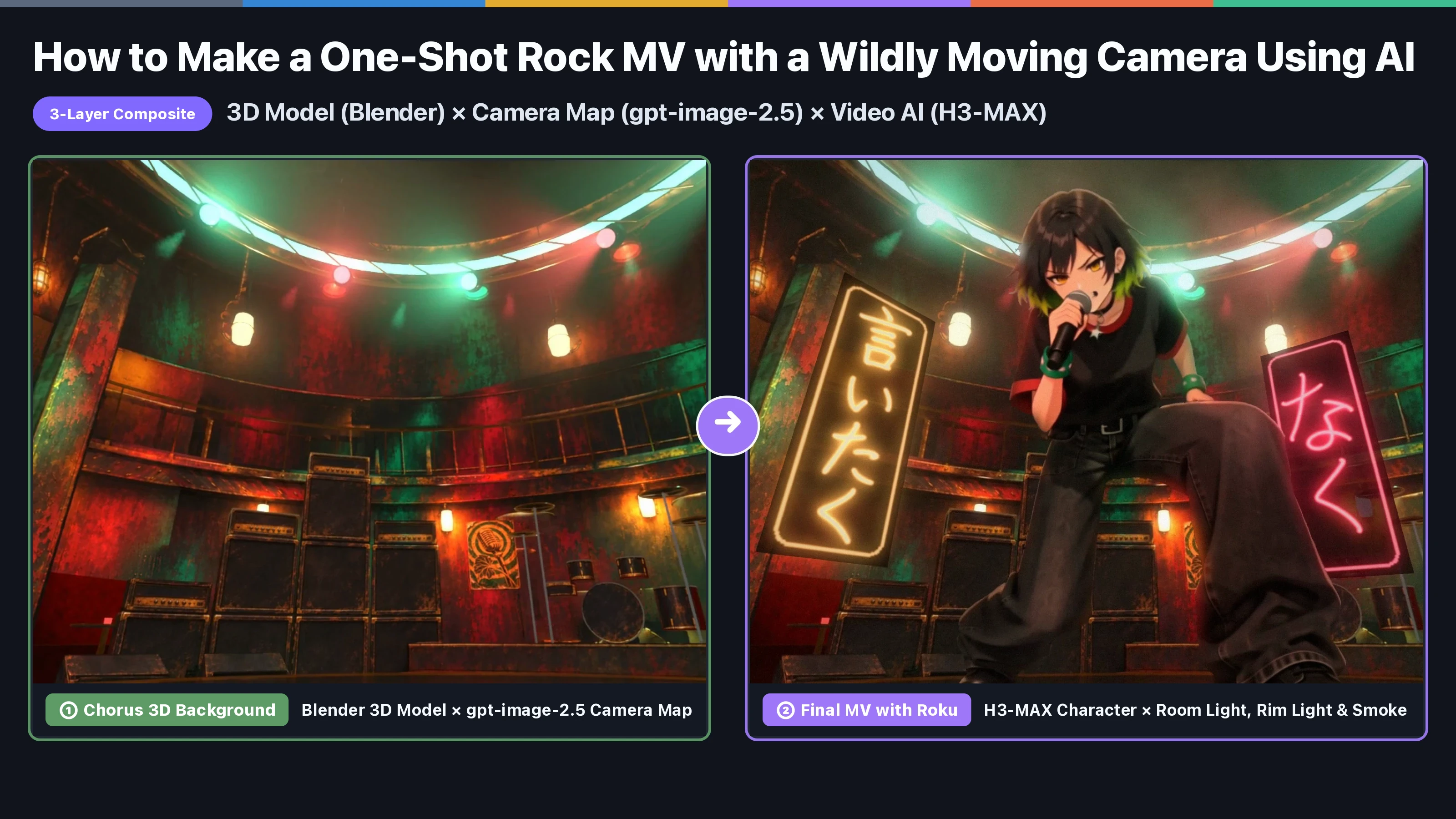
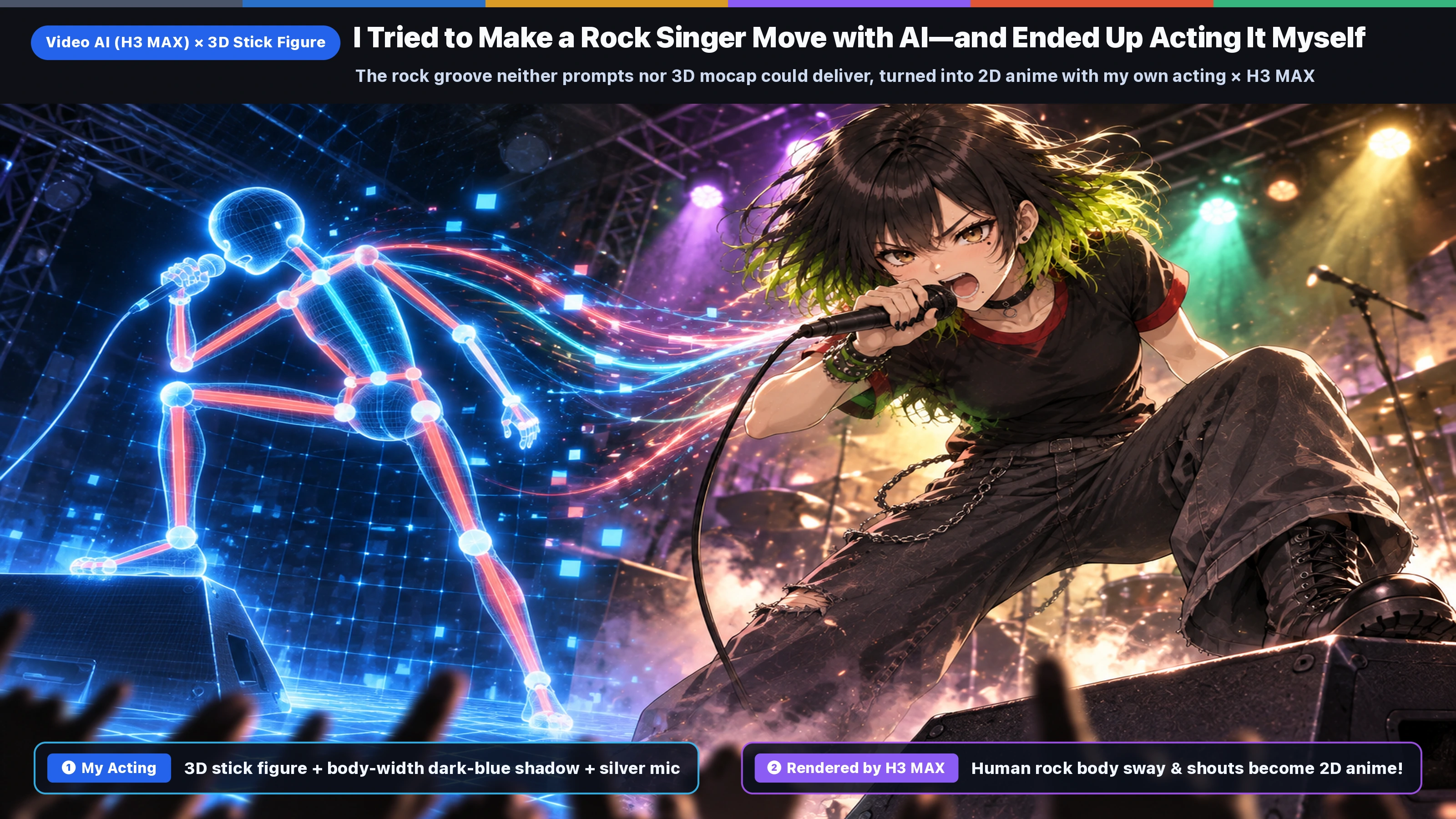
Hi, I'm Rey! I produce a 6-piece virtual rock band called WASHABI using AI.
When making anime MVs for the band with video AI (for example H3 MAX or H3 MAX Turbo on fal.ai), I kept running into the same problem: the characters just would not move like rock musicians.
(Note: For our usual cuts that are "animated from a start frame and an end frame," we use the Image-to-Video model H3 MAX Turbo. But when we pass three inputs at once—a guide video + a character reference sheet + the vocals—as in this MV, we use the Reference-to-Video model H3 MAX (minimax/h3-max/reference-to-video). The basics are covered in Image & Video AI Basics: Making Illustrations & Anime Videos of the Same Character with gpt-image-2.5 and fal.ai (H3) (JP).)
While making the one-shot MV for our new song "#035 Secret" (54.8 seconds, garage rock), we tried all kinds of approaches—"prompt instructions to the AI," "free 3D motion capture," and more—and learned this: "Don't build every scene the same way. The right answer is to choose the method by motion type: (1) sitting, (2) walking, (3) singing with the whole body!"
At first, we tried to leave everything to AI or free 3D motion data, but we simply could not get motion that felt like a rock singer. In the end, we arrived at this method: "From motion I acted out in front of my phone, build a 3D stick figure + a dark-blue shadow with thickness (Roku's body width added around the 3D bones) + a silver mic, place it in the guide of a blue 3D room, and hand that to H3 MAX."
This post includes steps like "extracting 3D joints (bones) from a phone video" and "placing the stick figure and a silver mic in a blue checkerboard 3D room built in Blender," but I didn't do any of it by hand.
My part was mainly to "air-sing along to the song in front of my phone" and to check the results. The Python scripts for skeleton extraction, beat sync, and 3D guide generation were written by AI agents (Claude Code, Codex, Antigravity, etc.) over many rounds of back-and-forth. At the end of the article you'll also find a starter prompt for AI agents.
1. What Can This 3-Scene Approach Do?
First, take a look at Chorus 1 of "#035 Secret," made with this method (Roku puts a foot up on the monitor, looks down, and shouts while riding the rhythm with her whole body). This kind of motion is really hard to get out of video AI.
Roku's first chorus: her left boot up on the stage monitor, knees sinking to the shuffle beat, tossing her head and leaning back as she sings (how we composited the 3D background and neon lyrics is explained in Article ①).
In this post, we split the MV's motion into 3 scene types (sitting, walking, singing) and go through what happened in each one and how we solved it.
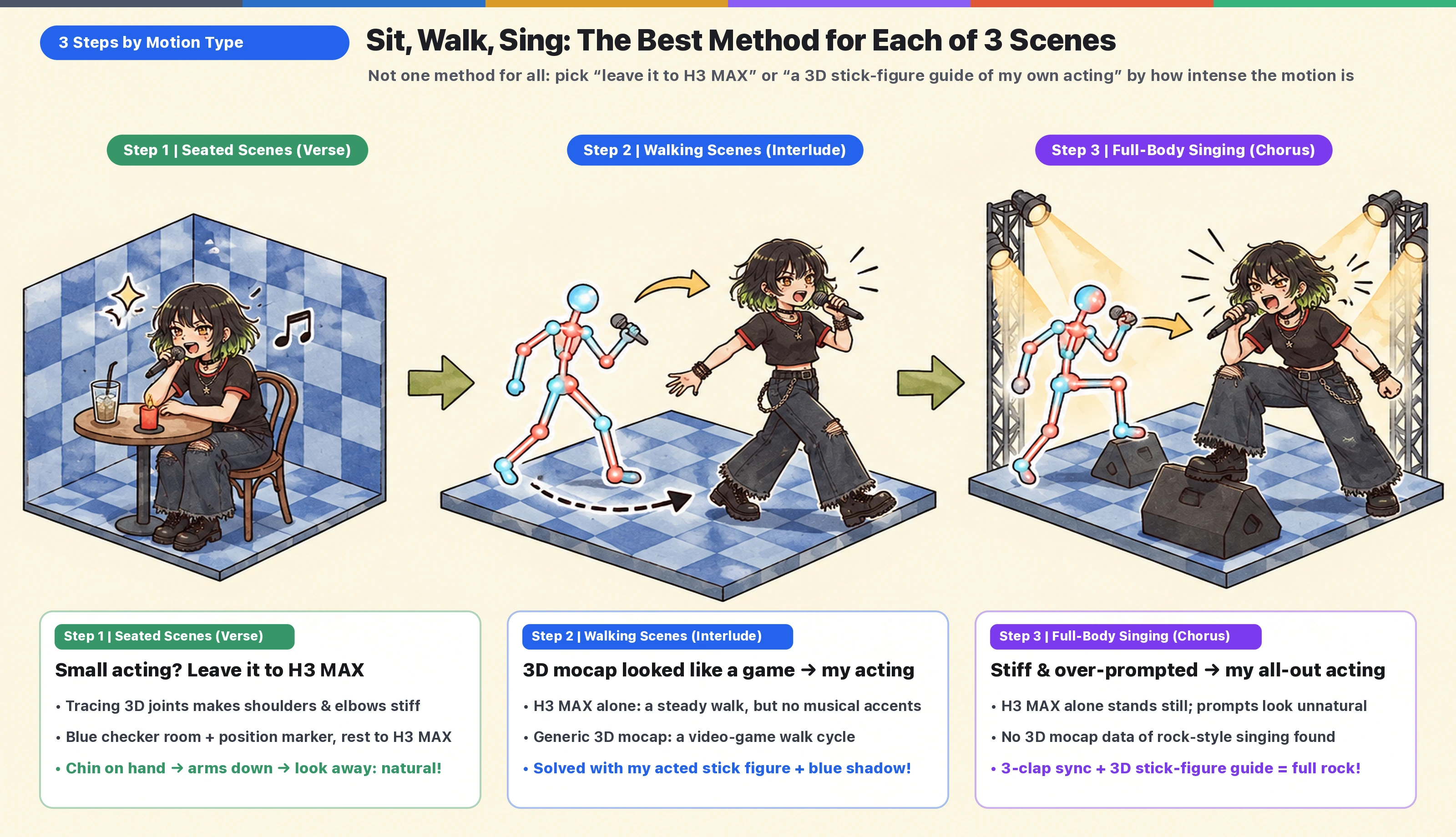
- Step 1 (seated scenes): For scenes with no big movement, like singing while sitting on a chair in the verse, the most natural result came from not making a motion guide at all and leaving it to H3 MAX with just "a blue checkerboard room + a limbless shape that marks the position."
- Step 2 (walking scenes): A plain walk works fine with H3 MAX, but matching the song's rhythm or adding changes partway through is hard with H3 MAX alone. Free 3D motion data turned it into "video-game locomotion," so we solved it with a stick-figure motion guide of my own acting.
- Step 3 (full-body chorus singing): Left to H3 MAX, Roku just stood in place. Directing the motion in detail with prompts produced unnatural movement. And we couldn't find any "rock singing" data in 3D motion libraries at all. Handing over a stick-figure motion guide of me performing all-out produced the best rock motion!
- H3 (fal.ai) basics: Image & Video AI Basics: Making Illustrations & Anime Videos of the Same Character with gpt-image-2.5 and fal.ai (H3) (JP) / How We Make an MV Every Week with AI Agents and No Video Editing Software (fal H3 × Remotion) (JP)
- Blender 5.2 basics: Blender 5.2 Crash Course for 2D Illustrators & MV Creators (JP) / Consistent Rooms & Props in AI Video: A Blender 3D Room Set + One Master Painting per Camera (EN)
- How we made the 3D room, neon lyrics, and 3-layer composite for #035 "Secret" (published at the same time): Article ①: How to Make a One-Shot Rock MV with a Wildly Moving Camera Using AI — 3-Layer Compositing of 3D Models (Blender) × Camera Map (gpt-image-2.5) × Video AI (H3 MAX)
2. Step 1 (Seated Scenes): For Verses Without Big Movement, "Leave It to H3 MAX" Works!
First up are Verse 1 (Roku sits at a round table in the audience area, chin in hand, and languidly starts singing) and Verse 2 (she sings while sitting at the bar counter).
For these "seated scenes with no big full-body movement," we didn't need to hand over human motion or a 3D skeleton at all.
In fact, when we tried to make H3 MAX trace detailed motion keyed onto the joints of a 3D mannequin, the shoulders and elbows went stiff. "Placing only a simple limbless shape (a marker for where she sits) in the blue checkerboard room and leaving all the acting to H3 MAX and the vocals" gave far more natural acting!
Here is the source video for the final Verse 1 (blue checkerboard background) that H3 MAX generated from "just a position marker."
We didn't pass any motion guide, yet as the camera circles around her, H3 MAX naturally performs a detailed sequence—"chin in hand → looks up and rests both arms on the table → shrugs and turns away with a pout → looks down at her glass"—with lip-sync matched to the vocals!
3. Step 2 (Walking Scenes): Walking to the Rhythm — "H3 MAX Only → 3D Mocap Failed → My Own Acting"
Next is the interlude (Roku walks across the stage to the guitar riff and the "Ah~ ha~ ah~!" vocal ad-lib). Here we went through three rounds of trial and error.
① A plain walk works with H3 MAX alone, but syncing to the rhythm or adding changes mid-walk is hard
Just like the verse, we first gave H3 MAX a guide with no motion guide—only "the 3D camera move + a limbless cylinder moving along"—and let it walk.
If she just walks at a steady pace, H3 MAX alone draws it beautifully. But locking her stride to the song's shuffle beat, or adding dynamics like "throwing in a provocative ad-lib mid-walk to land a hit," was hard to get by leaving it to H3 MAX.
② Generic 3D motion data (CMU) turned it into "video-game motion"
Our next idea: "What if we pour free, publicly available 3D motion capture (the CMU Graphics Lab Motion Capture Database) into a 3D model, line up the foot contacts and the moment of the jump exactly with the song's beats, and have H3 MAX redraw it? That should look cool, right?" So we experimented.
First, here is the motion video with the generic motion data applied to a 3D model and adjusted to the song's beats.
A 3D video where we put a run-and-big-jump motion clip (CMU `49_04`) on a 3D model and aligned the takeoff and landing to the song's beats frame by frame.
And here is the result of using this 3D motion as a guide and having H3 MAX redraw it as Roku.
The takeoff and landing land within 1 frame of the song's beats, but the arms-spread jumping pose and the upper-body balance looked, no matter how you see it, like "movement and jump animations from a 3D action game"...
Generic 3D motion data is a record of "everyday walking and sports movements," not rock band stagecraft. So even with AI painting 2D anime art over it, the "game character moving around" feel never went away.
③ So I Acted It Out Myself! (Stick-Figure Capture Guide → Done!)
So I propped up my phone, played the song, and performed the walk to the rhythm myself, fully in character as Roku!
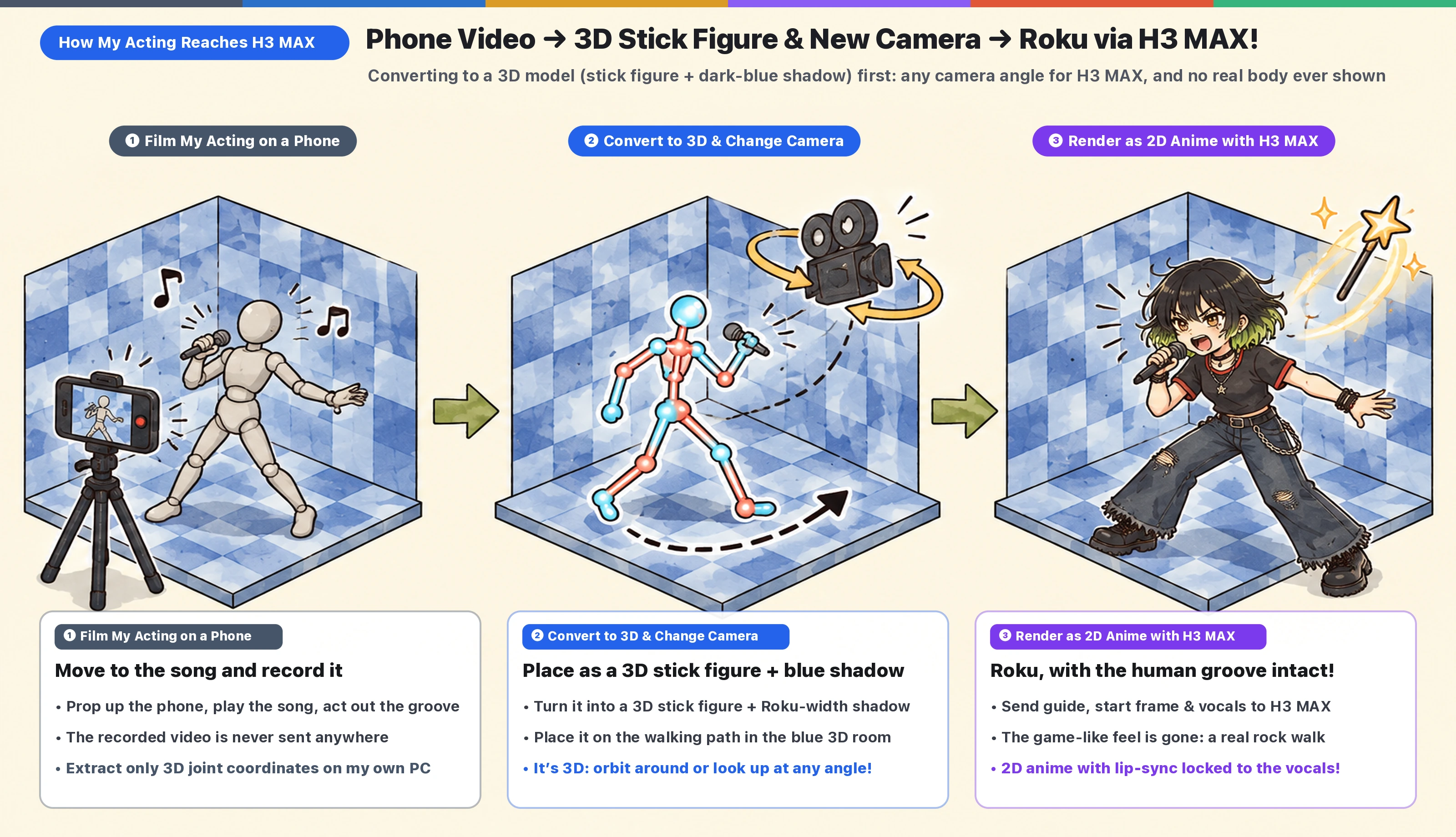
The phone video never leaves my computer. On my local PC, it is first converted into a 3D model (bone lines + joint points + a silver mic in the right hand), then given "a dark-blue shadow with thickness matched to Roku's body width (capsule-shaped thickness added to the 3D bones)," and placed on the walking path in the blue checkerboard 3D room.
(Note: With only thin stick-figure lines, H3 MAX tends to mistake them for "lines in the background" or "a pattern on the clothes." On the other hand, if you add a shadow thicker than the real body, it fills the extra area with "black haze" or "mysterious poles." The key is to pass a dark-blue shadow around the 3D bones that exactly matches Roku's body width. Because it goes through 3D once, you can change the camera angle freely, and no live-action footage or real body silhouette ever appears!)
First, here is the "stick figure + dark-blue shadow guide video in the blue checkerboard room" built by capturing my motion.
A guide video where the 3D bones extracted from my acting on the phone (left side = red, right side = light blue, spine = white) are given Roku's body-width "dark-blue shadow" and a silver mic in the right hand, then placed in the blue checkerboard 3D room.
And here is the "final interlude source video (blue checkerboard background)" that H3 MAX generated from this motion!
The game-like feel from the 3D mocap is completely gone. She keeps time with her shoulders on the shuffle beat and walks while singing provocatively—a groove only a rock band has!
4. Step 3 (Singing Scenes): The Most Important Part, the Chorus — "H3 MAX Stands Still → Prompts Failed → My Own Acting"
Then comes the biggest climax of the MV: "Chorus 1 (Roku puts a foot on the monitor, looks down, and sings hard with her whole body)." Here, too, we tested things step by step.
① Left to H3 MAX as-is, the video has no big movement
First, just like the verse in Step 1, here is the Chorus 1 source video where we only placed a position marker and left the acting to H3 MAX.
It adds pointing and hand gestures, but her feet stay planted and she sings politely with only her upper body. Against the explosive rock energy of the chorus, we couldn't shake the "just standing there" feeling.
② Directing the motion in detail with prompts still gives strange movement
"Then what if we drop the figure guide and direct rock-style motion thoroughly in words (the prompt)?" With that idea, we passed a camera guide of just the blue room and sent H3 MAX a passionate prompt like this.
The prompt we actually sent (excerpt):
*She is a wild rock singer with a heavy, low groove, full of attitude. On the first words she drops low with her knees bent and her head bowed over the microphone. She kicks one boot up behind her, hops and stamps on each 'naku', throwing her head. Then she stands wide and sings hard into the microphone, one hand in her hair, and throws her free arm out to the side on the last words.*
('naku' is a word in the Japanese lyrics.)
Here is the video that came back from H3 MAX.
There is motion, but it's so "not it"...
③ 3D motion data has nothing like "a rock singer singing"
So what about the free 3D motion data (CMU, etc.) we tried in Step 2? General-purpose motion databases have actions like "running, walking, jumping, boxing," but we couldn't find any data for "the motion of a rock vocalist with one foot on a stage monitor, bouncing the knees to a 103 BPM shuffle beat while gripping the mic and shouting."
④ I Acted It Out! (Beat Sync with 3 Claps & Converting to a Low-Angle Shot Looking Up via a 3D Stick Figure → Done!)
That's when I made up my mind: "The feel of a rock chorus can only come from a human riding the song and acting it out!" So I performed Chorus 1 in front of my phone, too, air-singing all-out.
There were two tricks here:
1. Sync to the song's beat with millisecond accuracy using "3 claps" at the start:
- In the bar right before the performance (beats 1, 2, 3 before the chorus), I clapped three times toward the camera—"clap, clap, clap"—before starting to sing. This let us lock the frame times of the claps to the song's beats with millisecond accuracy.
2. Converting the video into a 3D model (3D stick figure) once lets the camera swing freely to an "ultra-low angle looking up," even from a front-facing phone shot:
- The phone shot was taken from the front at eye level. But because the video is first converted into a 3D model (stick figure + a dark-blue shadow at Roku's body width) and placed on top of the stage monitor, we can shoot it with a 3D camera looking up from an ultra-low angle just above the floor and still get a three-dimensional guide of her looking down with her left foot on the monitor. (Technical note: we use Google's pose estimation library MediaPipe to extract 3D joint coordinates from the phone video, and place them scaled to Roku's height of 1.48 m. Also, so that the small rock sways don't get flattened, we keep the joint smoothing width to just "1 frame.")
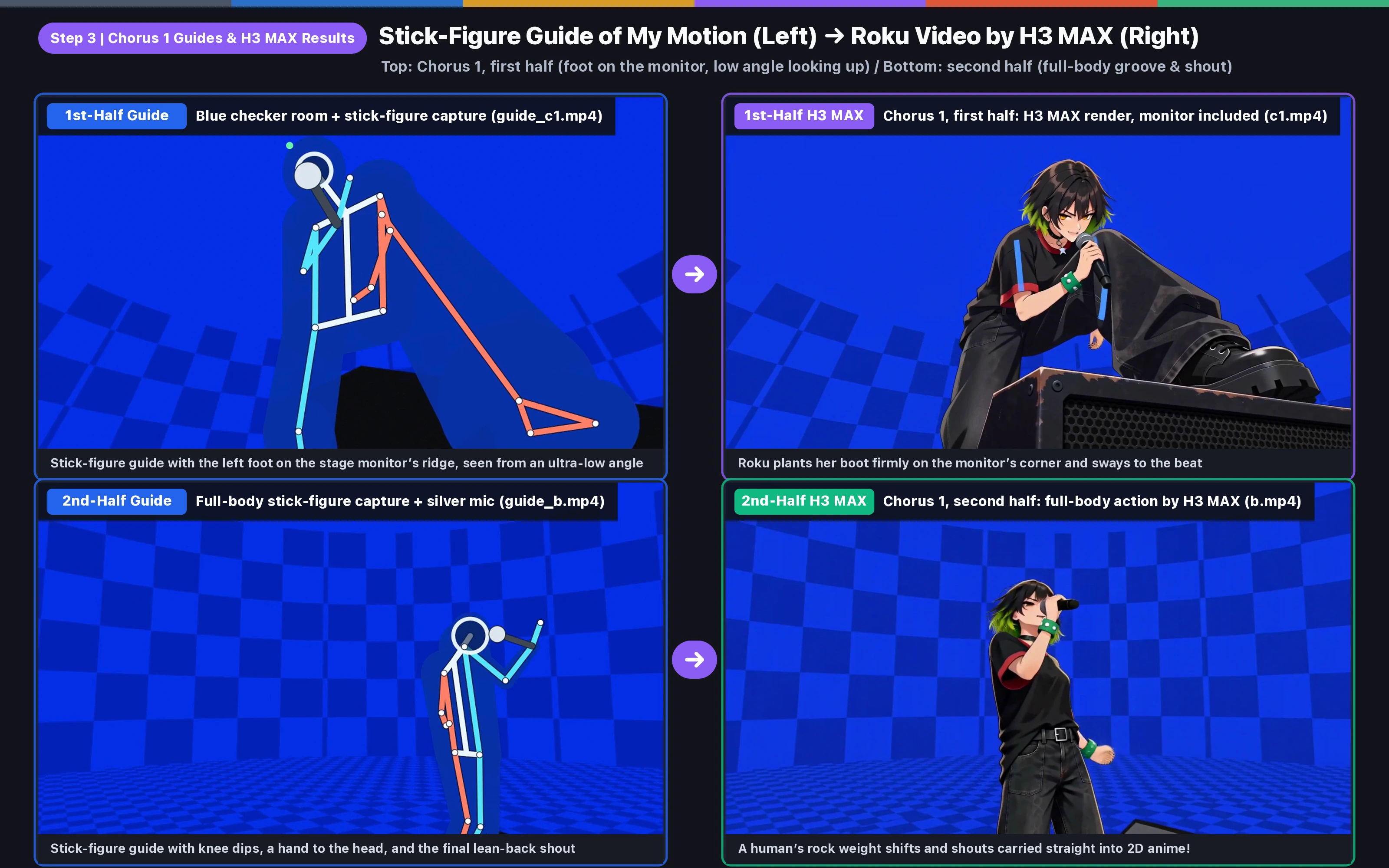
Here are the Chorus 1 motion guide videos built by capturing my motion (first half: looking up at the monitor / second half: full-body action)!
A 3D stick figure + dark-blue shadow guide, from a low angle up to a face close-up, with the left foot on the stage monitor, swaying to the beat while looking down.
A full-body guide: the foot comes down from the monitor, the knees sink deep, a hand goes to the head, and on the last line "Tsukareru desho!" she leans back and shouts.
And now, take a look at the "final Chorus 1 source videos (blue checkerboard background)" that H3 MAX generated from this motion!
Her boot planted firmly on the corner of the monitor speaker, swaying her upper body to the beat while looking down—a rock camera shot achieved without a single frame of lag!
From the hand-to-the-head gesture to the leaning-back shout, a human rock groove turned straight into Roku's 2D animation!
5. Copy-Paste Ready! AI Agent Prompt for "3D Stick-Figure Capture × H3 MAX 2D Anime MV Production"
The prompt below is a starting point for having an AI agent (Claude Code, Codex, Antigravity, etc.) set up a pipeline that turns an acting video you shot on your phone into a 3D stick figure + dark-blue shadow guide and animates it with video AI (H3 MAX). Adapt it to your footage and song, and review the result of each step as you go.
# For AI Agents: Scene-by-Scene Motion Design (Sitting, Walking, Chorus Singing) & 3D Stick-Figure Capture × H3 MAX Control Spec

You (the AI agent) will switch guide methods according to how intense the motion is in each MV scene. From an acting video the user shot on a smartphone or similar, extract a "3D skeleton (bones and joint points)" with MediaPipe, add a "dark-blue shadow (capsule shapes)" around it that matches the character's body width, project it through the camera of a blue checkerboard 3D room in Blender, and generate lively 2D character animation with video AI (fal.ai `minimax/h3-max/reference-to-video`).

## Step 1: Seated scenes (small acting)
1. Do not use a 3D skeleton or live-action motion. Place only a "limbless shape that marks the position" in the blue checkerboard 3D room.
2. Leave small gestures (chin on hand, gaze, arm movement) and lip-sync to the prompt and the vocals (`reference_audio_urls`).

## Step 2: Walking / moving scenes (interludes, etc.)
1. Do not use generic 3D motion capture (it looks like a game). Place the 3D joints extracted from the user's acting video (the `world` coordinates in `pose_*.json`) on a walking path in 3D space (Pchip interpolation), rotate them toward the direction of travel, and ground the feet at floor height.
2. Add dark-blue (e.g., `RGB(10, 30, 150)`) capsule shadows around the 3D bones to match the character's body width, draw an 18 cm silver microphone from the right hand (joint 16) toward the mouth (joint 0), and project it with the blue checkerboard 3D room camera (`cameras_full.json`).

## Step 3: Full-body, high-energy singing scenes (chorus, shouts)
1. **Privacy protection (never reveal the real person or a live-action silhouette)**: Read the original live-action video only from a local temporary folder, and never copy or send it to external APIs or public folders. Visualize using only the capsule shadows, bone lines, joint points, and silver microphone computed from the 3D bones.
2. **Beat sync with clap markers**: Detect the frame times of the 3 claps at the start of the acting video (e.g., on beats 1, 2, 3 of the bar before the chorus), and align the offset to the song's beat times with millisecond accuracy.
3. **Support for low-angle shots looking up**: Scale the 3D world joints to the character's height (e.g., 1.48 m to the nose) and pin the left foot (joints 27 and 31) to the ridge of the stage monitor, so that an ultra-low-angle, looking-up 3D camera projection is possible even from a smartphone video shot from the front.
4. **Keep smoothing to a minimum (1 frame)**: Convert 30 fps to 24 fps by time interpolation, and limit Gaussian smoothing of the joints to a width of 1 frame on each side (`sigma=1.0`) (at 2.5 frames or more, the small rock sways and groove of 0.4 seconds or less get flattened).
5. **Guide length and splitting**: For a single guide longer than 4 seconds, H3 MAX plays the guide back slowly and lag accumulates, so split it into pieces of about 3 seconds (73 frames) and use the last good frame of the previous video as the next start frame.
6. Related Guides (#035 "Secret" Making-Of Series & Detailed H3 / Blender Guides)
Detailed setup and usage of H3 MAX (fal.ai) and Blender 5.2 introduced in this article, plus the 3D room compositing and songwriting stories behind "#035 Secret," are covered in the articles below. Be sure to check them out!
- Article ①: How to Make a One-Shot Rock MV with a Wildly Moving Camera Using AI — 3-Layer Compositing of 3D Models (Blender) × Camera Map (gpt-image-2.5) × Video AI (H3 MAX)
- Article ③: Original Songwriting with Suno + Logic: Behind the Scenes of #035 “Secret” (EN)
- Image & Video AI Basics: Making Illustrations & Anime Videos of the Same Character with gpt-image-2.5 and fal.ai (H3) (JP)
- Blender 5.2 Crash Course for 2D Illustrators & MV Creators (JP)
- Consistent Rooms & Props in AI Video: A Blender 3D Room Set + One Master Painting per Camera (EN)
- How We Make an MV Every Week with AI Agents and No Video Editing Software (fal H3 × Remotion) (JP)